
Everything a support worker needs, on the phone they already have
No app store, no training day. Workers open a link, sign in, and add CareHub to their home screen. It works on Android and iPhone.
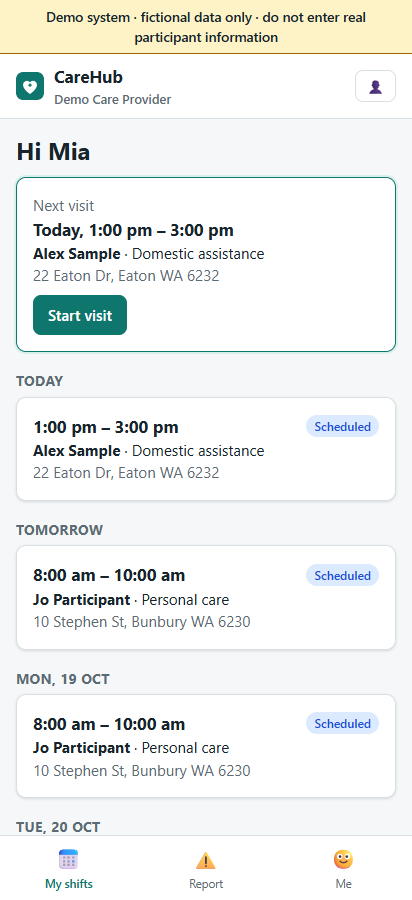
The next visit, front and centre
- Today's and upcoming shifts, with the next visit highlighted.
- Open shifts they can pick up with one tap.
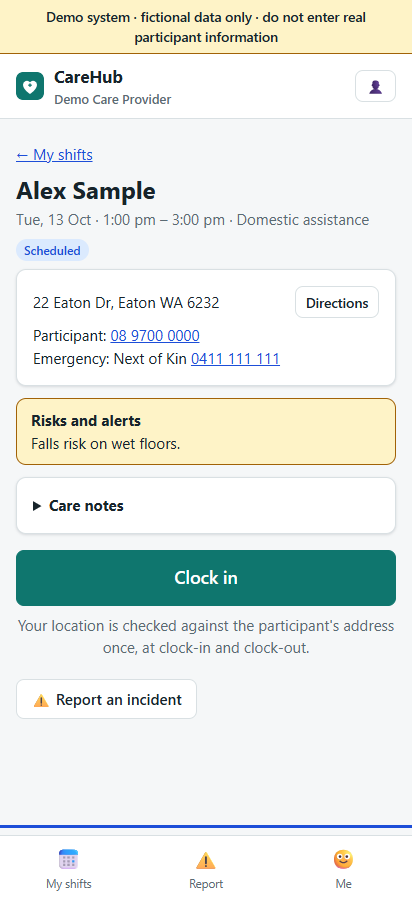
- The participant's risks and alerts, care notes and the coordinator's instructions.
- Directions to the address, and tap-to-call for the participant and emergency contact.
A complete record in under a minute
GPS clock-in and clock-out
Location is checked once against the participant's address at clock-in and once at clock-out. It is not tracked during the visit.
Progress notes by voice
Workers speak and the phone types. Notes can be shared with the family when appropriate.
Participant sign-off
The participant or their carer signs with a finger before the worker clocks out.
Km and expenses
Travel with the participant and out-of-pocket costs, recorded at clock-out for billing and payroll.
Incident reports
Report from the visit screen with the facts while they're fresh. Serious incidents alert the office immediately.
Me
Their own check expiry dates, usual availability, leave requests and password.
Installing takes a minute
Open the link
The office sends each worker the CareHub address and a temporary password.
Sign in
Then change the password under Me.
Add to home screen
Android: Chrome menu ⋮ → Add to Home screen. iPhone: Safari Share → Add to Home Screen.
Good to know
- Workers only see their own shifts and the participants they are rostered with.
- Clock-in opens up to two hours before a shift starts.
- If location is unavailable, the worker can still clock in; the office sees it marked as unverified.
- The app opens offline; clocking in and out needs a connection.
Try it on your own phone
Open the demo on your phone and sign in as the support worker.